Download Snapchat Videos Without App: Free Guide (2026)
If you want to download Snapchat videos without app installs, logins, or sketchy APK files, you are in the right place — because that is exactly how this works. You open a browser tab, paste a public Snapchat link, and save the original HD video. No app to install, no account to create, no password to hand over. I tested the whole flow on SnapToDown this morning with a real public Spotlight link, and from paste to a ready download took about two seconds. This guide walks you through the same steps on iPhone, Android, and PC, tells you honestly what cannot be downloaded, and shows you why the browser route beats installing yet another app.
Why download Snapchat videos without app installs at all?
Most “Snapchat downloader” apps you find outside the official stores have the same pitch: install us, then log in with your Snapchat account. That is the moment to stop. A downloader that needs your login can see far more than the one video you wanted, and sideloaded APK files from random sites are a classic way to pick up adware or worse. Even the legitimate apps on the Play Store and App Store want storage permissions, notification permissions, and a permanent home on your phone for a job you might do twice a month.
A browser tool flips all of that around. It asks for exactly one thing — the link — and gives you exactly one thing back: the video file Snapchat itself serves. There is nothing to update, nothing running in the background, and nothing to uninstall later. It works on a borrowed laptop, a work computer where you cannot install software, a Chromebook, or a phone that is nearly out of storage. That is the whole appeal of choosing to download Snapchat videos without app clutter: the tool disappears when you close the tab.
How to download Snapchat videos without app: the 3-step method
The method is the same on every device, because the browser is the same everywhere. Here it is, exactly as I ran it today.
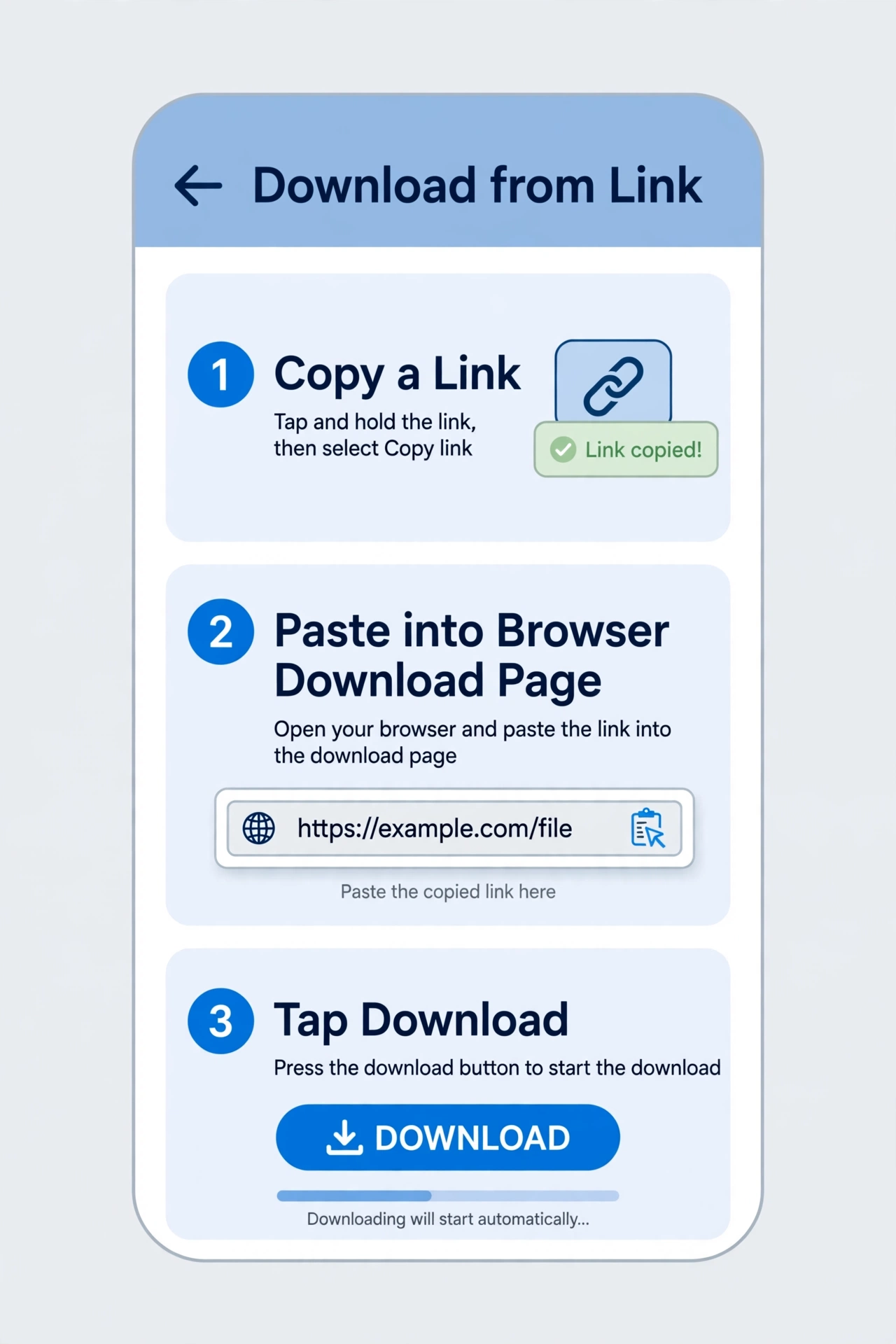
Step 1 — Copy the link in Snapchat. Open the Spotlight video or public Story you want. Tap the share arrow and choose Copy Link. On a computer you can do the same from snapchat.com — just copy the address from the browser bar. Short t.snapchat.com share links work too; the tool resolves them the same way.
Step 2 — Paste it into the downloader. Open snaptodown.com in any browser — Safari, Chrome, Firefox, Edge, Samsung Internet, all fine — paste the link into the box, and hit download. No sign-up form pops up, because there is no account to sign up for.
Step 3 — Save the MP4. A “DOWNLOAD READY” card appears with the original video. Tap it and the file saves as a standard MP4 with its sound intact. That is the entire process. In my test this morning, a public Spotlight clip — a cooking video about crab legs, posted October 22, 2026 — resolved in 2.23 seconds, and the file came straight from Snapchat’s own content server, which is why there is no watermark stamped on it. Nothing was added; it is the file Snapchat serves.
Where the video lands on each device
The download itself is instant; finding the file afterwards is where people get stuck. Each device hides it in a slightly different place.
On iPhone (Safari)
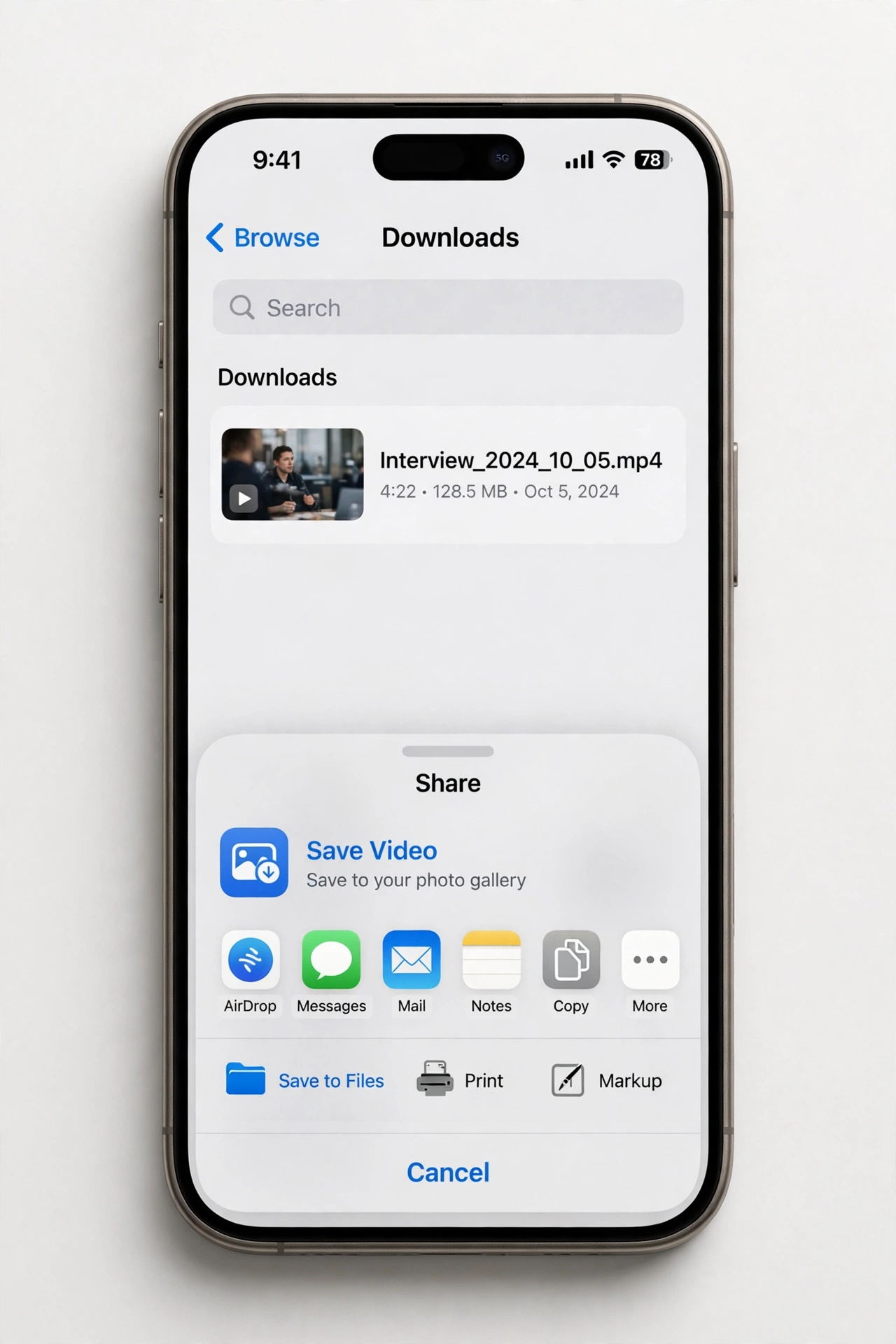
This is the one quirk worth knowing before you start. On iPhone, Safari saves the video to the Files app, not straight to Photos. Open Files, go to Downloads, and you will see your MP4 there. Press and hold it, tap Share, then choose Save Video — now it is in your camera roll like any other clip. If the video opens and plays in a browser tab instead of downloading, tap the share icon in that tab and choose Download, or long-press the video and save it from there. This is a Safari behaviour, not a fault in the downloader, and it catches almost everyone the first time.
On Android (Chrome)
Android is simpler. Chrome saves the file to your Downloads folder and shows a notification when it is done. Within a few seconds it also appears in Gallery or Google Photos under the Downloads album. If you cannot see it, open Files → Downloads and look for the newest MP4. No extra step needed, and no app install was involved at any point.
On PC or Mac
On a desktop browser the file goes to your usual Downloads folder. One gotcha: if the video opens in a new tab and starts playing instead of downloading, right-click the video and choose “Save video as” — that forces the download. This is the same trick that works for any direct video file on the web.
Browser tool vs app vs screen recording: an honest comparison
| Method | Install needed? | Login needed? | Quality | Watermark | Risk |
|---|---|---|---|---|---|
| Browser downloader (SnapToDown) | No | No | Original HD MP4 | None | Low — no permissions, no password |
| Downloader app (store) | Yes | Sometimes | Varies | Sometimes | Medium — permissions, ads, tracking |
| Sideloaded APK | Yes, outside store | Often | Varies | Sometimes | High — malware and account risk |
| Screen recording | No (built-in) | No | Lower — re-encoded, includes UI | No, but player controls and status bar can creep in | Low, but ugly results |
| Snapchat’s own save | No | Yes (your account) | Original | None | None — but only works for your own Snaps and Memories |
Screen recording deserves a special mention because it is the fallback everyone suggests. It works, but the result is a re-encoded copy of your screen, not the original file — softer picture, bigger file, and any notification that pops up mid-recording is in your video forever. A browser download gives you Snapchat’s own file, untouched. And Snapchat’s own save button, for all its quality, only covers your own content; it will never save someone else’s public Spotlight clip, which is usually the whole point.
What you cannot download — and why no tool can
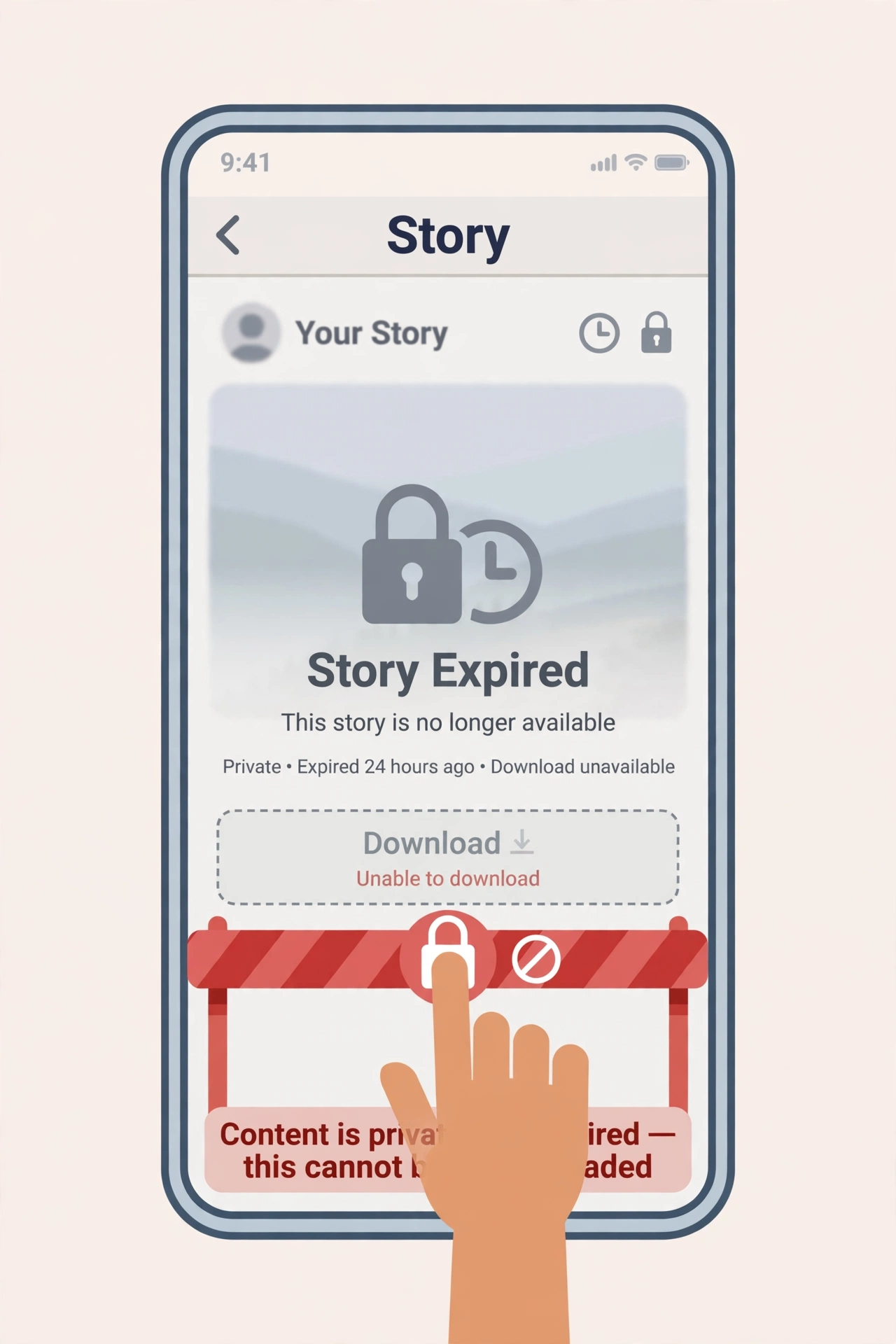
Here is the honest part, and it matters more than the steps. A browser downloader can only fetch what Snapchat itself makes public. I proved this to myself today by feeding the tool three links that should fail — and all three did, fast, with clear errors:
- Private or friends-only Stories: Snapchat enforces audience settings on its own servers, not just in the app. A link to a friends-only Story will not resolve, full stop.
- Expired Stories: a public Story lives for 24 hours. After that it is gone from Snapchat’s servers, and no downloader, app, or website can bring it back.
- Deleted posts: same story — delete means delete.
- 1:1 Snaps and chats: these are private by design and have no public link at all.
- Profile pages: pasting a profile link like snapchat.com/@someone is not a video link. The tool told me so in under a second: “Please paste a valid public Snapchat link (Spotlight, Story or video page).”
When I tested a link with its media ID deliberately altered, the tool came back in 1.55 seconds with: “Snapchat returned 404 — this link looks dead, private, or expired.” That error is Snapchat’s own 404 surfaced honestly. Any site that promises to download private or expired content anyway is lying to you — that is the single best way to spot a scam downloader.
Troubleshooting: when a link will not download
Run through this list before assuming the tool is broken — in my experience the link is the problem nine times out of ten.
- “Please paste a valid public Snapchat link”: you pasted something else — a profile page, a homepage, or a non-Snapchat URL. Go back to the video itself and use Share → Copy Link.
- “Snapchat returned 404”: the post is dead, private, or expired. Check whether it still plays inside Snapchat; if it does not play there, nothing can download it.
- Video plays in a tab instead of downloading: right-click (PC) or use the share icon (iPhone) and choose Save/Download. See the device section above.
- Cannot find the file on iPhone: check Files → Downloads first, then Share → Save Video to move it to Photos.
- Link copied from inside a chat: chat links are not public links. Open the original Spotlight or Story post and copy from there.
- Still stuck: try the same link in a different browser. If it fails everywhere, the content itself is the problem, not your browser.
If you want the full fix list for every error type, our troubleshooting guide covers nine fixes in depth.
Is it safe — and is it legal?
On safety, the browser route is the safest way to do this. You never type a password anywhere, you grant no permissions, and nothing is installed that could update itself into something nasty later. The one rule: never use a downloader that asks you to log in with Snapchat. Snapchat itself warns against third-party apps asking for your credentials, and a real link-based tool has no reason to ask.
On legality, the short version is: downloading a public video for your own personal, offline viewing is generally fine; re-uploading someone else’s video as your own is not. Respect the creator, do not repost without permission, and keep private content private. Our full breakdown — including what Snapchat’s own terms say — is in Is It Legal to Download Snapchat Videos? And if you are wondering whether the creator gets told, the answer is no for public downloads — see Does Snapchat Notify When You Download a Story?
One more safety note from Snapchat’s own support pages: who can see a Story is controlled by the poster’s audience settings (Snapchat Support: who can see My Story). That setting is exactly what decides whether a link is downloadable at all — which is why public Spotlight clips, public by design, are the most reliable downloads of all.
Frequently asked questions
Can I really download Snapchat videos without app installs?
Yes. Any modern browser on iPhone, Android, Windows, or Mac can do it: copy the public link, paste it into a web downloader like SnapToDown, and save the MP4. Nothing is installed at any step.
Do I need a Snapchat account to use a browser downloader?
No. You need the public link, which you can copy from the Snapchat app or from snapchat.com on a computer. The downloader never asks you to log in, and you should leave any site that does.
Is the video quality the same as in the app?
Better, in one sense: you get the original file Snapchat serves, not a screen recording of it. In our test the file came directly from Snapchat’s content server in HD, with sound, and no watermark added.
Why does my iPhone save the video to Files instead of Photos?
That is how Safari handles downloads. Open Files → Downloads, press and hold the video, Share → Save Video, and it lands in your camera roll. It takes about five seconds once you know where to look.
Can I download a Story after it expires?
No — and nobody can. After 24 hours Snapchat removes a Story from its servers. Save public Stories while they are still live, or use our Snapchat Story Downloader guide to grab them in time.
Are there limits on how many videos I can download?
Not on SnapToDown — no daily cap, no account, no paywall. Some rival tools cap free downloads (one well-known competitor stops at five a day), which is worth checking before you commit to one.
The bottom line
You do not need an app for this job, and installing one only adds risk, permissions, and clutter for a task a browser tab does better. Copy the public link, paste it at snaptodown.com, save the original HD MP4 — on iPhone remember the Files → Save Video step, on Android check Downloads, on PC right-click if it opens in a tab. And when a link fails, believe the error: dead, private, or expired content is gone, and any tool claiming otherwise is selling you something. Try it with the next public Spotlight clip you want to keep — it takes less time than installing an app would.